Introduction
- Contents
- Airflow components
- Architecture Diagrams
1. Airflow Components
-
Airflow’s architecture consists of multiple components.
- (1) components required for a bare-minimum Airflow installation,
- (2) an optional component to achieve better Airflow extensibility, performance, and scalability.
-
Required components
- A scheduler, which handles both triggering scheduled workflows, and submitting Tasks to the executor to run.
- The executor, is a configuration property of the scheduler, not a separate component and runs within the scheduler process.
- There are several executors available out of the box, and you can also write your own.
- A webserver, which presents a handy user interface to inspect, trigger and debug the behaviour of DAGs and tasks.
- A folder of DAG files, which is read by the scheduler to figure out what tasks to run and when to run them.
- A metadata database, which airflow components use to store state of workflows and tasks.
- Setting up a metadata database is described in Set up a Database Backend and is required for Airflow to work.
- A scheduler, which handles both triggering scheduled workflows, and submitting Tasks to the executor to run.
-
Optional components
- Optional worker, which executes the tasks given to it by the scheduler.
- In the basic installation worker might be part of the scheduler not a separate component.
- It can be run as a long running process in the CeleryExecutor, or as a POD in the KubernetesExecutor.
- Optional folder of plugins.
- Plugins are a way to extend Airflow’s functionality (similar to installed packages).
- Plugins are read by the scheduler, dag processor, triggerer and webserver. More about plugins can be found in Plugins.
- Optional triggerer, which executes deferred tasks in an asyncio event loop.
- In basic installation where deferred tasks are not used, a triggerer is not necessary.
- More about deferring tasks can be found in Deferrable Operators & Triggers.
- Optional dag processor, which parses DAG files and serializes them into themetadata database.
- By default, the dag processor process is part of the scheduler, but it can be run as a separate component for scalability and security reasons.
- If dag processor is present scheduler does not need to read the DAG files directly. More about processing DAG files can be found in DAG File Processing
- Optional worker, which executes the tasks given to it by the scheduler.
2. Architecture Diagrams
-
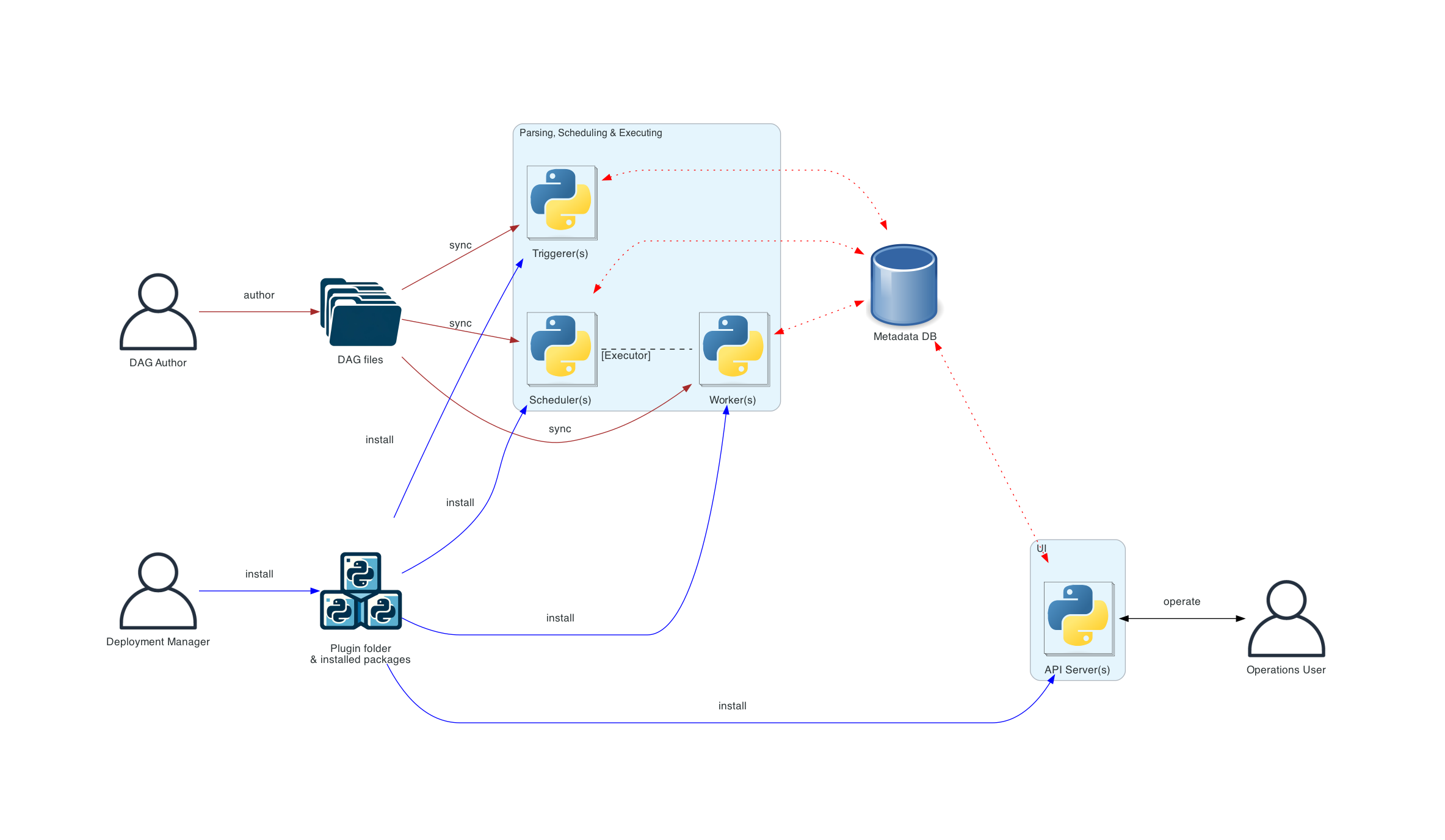
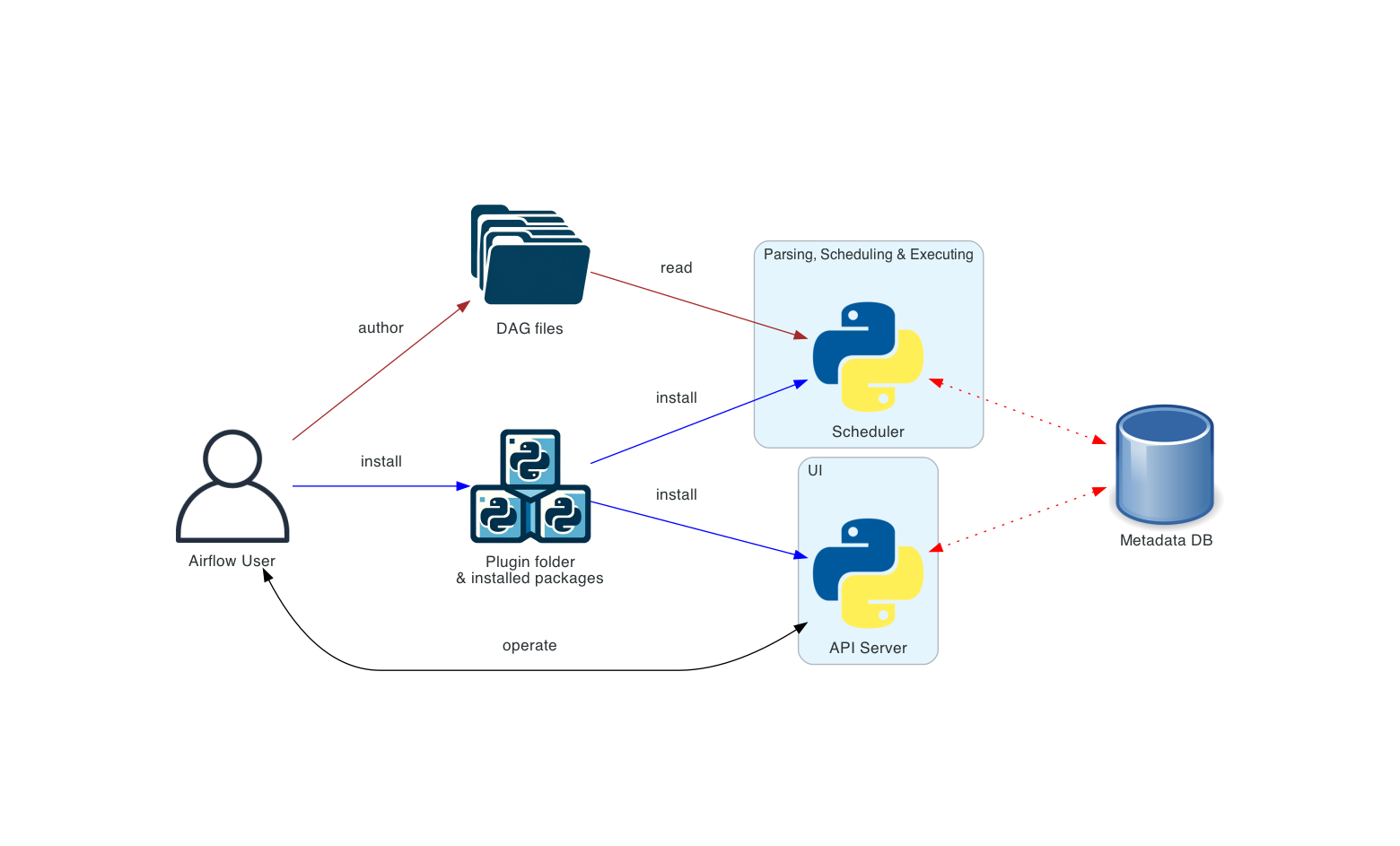
connection types in the diagrams
- brown solid lines represent DAG files submission and synchronization
- blue solid lines represent deploying and accessing installed packages and plugins
- black dashed lines represent control flow of workers by the scheduler (via executor)
- black solid lines represent accessing the UI to manage execution of the workflows
- red dashed lines represent accessing the metadata database by all components
-
Basic Airflow Deployment
- The simplest deployment of Airflow, usually operated and managed on a single machine.
- Such a deployment usually uses the LocalExecutor,
- The webserver runs on the same machine as the scheduler.
- There is no triggerer component, which means that task deferral is not possible.
- Distributed Airflow Architecture
- Components of Airflow are distributed among multiple machines and where various roles of users are introduced - Deployment Manager, DAG author, Operations User.
- The webserver does not have access to the DAG files directly.
- The code in the
Codetab of the UI is read from the metadata database. - The webserver cannot execute any code submitted by theDAG author.
- The Operations User only has access to the UI and can only trigger DAGs and tasks, but cannot author DAGs.
- The code in the
- The DAG files need to be synchronized between all the components that use them - scheduler, triggerer and workers.